

Configuration Manager's collections can be updated on schedule (Full Update) or incrementally (Incremental Update). It is not good when the latter mechanism reaches more than 200 collections[1]. Of course, viewing the settings of individual collections is not the best idea, it's better to prepare a report querying the data from the SQL database. You can use the v_Collection view for this purpose. In this view there is a RefreshType field, described in the documentation[2],[3].
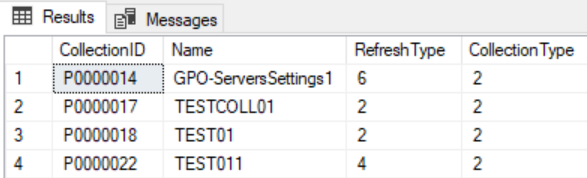
Expanding the meaning of the RefreshType field, we get, for example, the following query:
SELECT CASE
WHEN RefreshType = 6 THEN 'Incremental and scheduled'
WHEN RefreshType = 4 THEN 'Incremental only'
WHEN RefreshType = 2 THEN 'Scheduled only'
WHEN RefreshType = 1 THEN 'Manual'
WHEN RefreshType = 0 THEN 'None'
ELSE 'Unknown'
END as Refresh
, COUNT(*) as Number
FROM v_Collection
GROUP BY RefreshType
A sample report using the given SQL query:
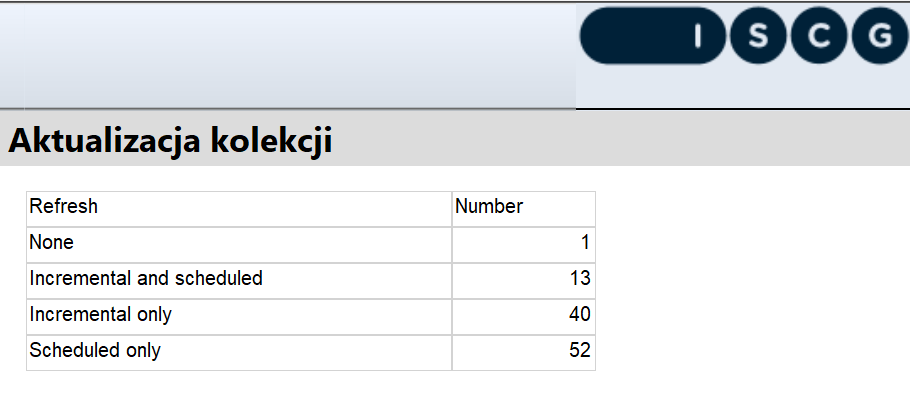
Of course, keep in mind that the number of collections using incremental updating is the sum of type 4 and 6, so in our example 13 + 40 = 53 (so we are within the recommendations).
________________________________________________________________________
[1] https://learn.microsoft.com/en-us/mem/configmgr/core/clients/manage/collections/best-practices-for-collections#bkmk_incremental
[2] https://learn.microsoft.com/en-us/mem/configmgr/develop/reference/core/clients/collections/sms_collection-server-wmi-class#refreshtype
[3] https://learn.microsoft.com/en-us/powershell/module/configurationmanager/new-cmdevicecollection?view=sccm-ps